Your Amazon title Looks Fine in Seller Central. So Why Is Your Brand Missing From Search?
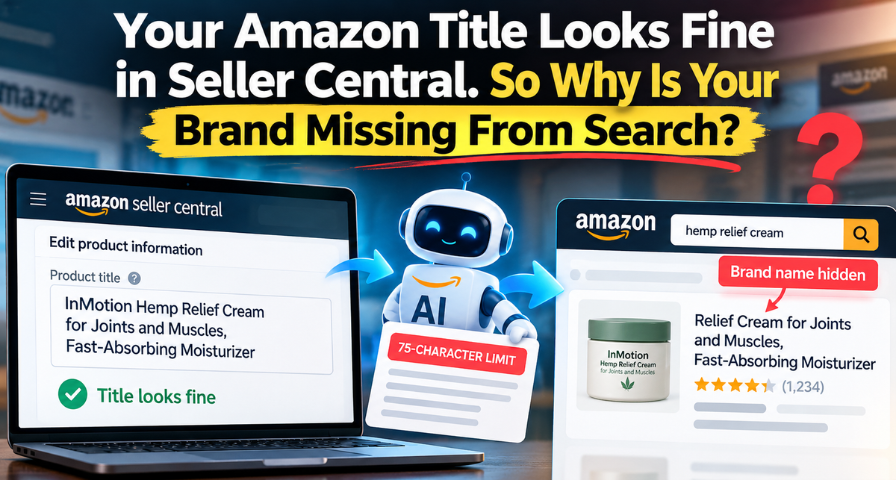
There can be a discrepancy between how your Amazon product title appears on the screen when you view it on Seller Central and how it shows up when a customer searches for it. In one such instance that has been reported by a seller, daily sales of a product declined from about $1,400 to $800 after the disappearance of the brand name from the customer-facing side of a product title. The conversion rate was down to 14.77 percent. When the seller discovered this problem and corrected the error, they claimed that the next day their conversion went up to 28 percent with sales increasing back to roughly $1,575. This is a single seller's account and not some verifiable data, but it is worth noting because it provides an example of something that does need to be understood regardless of the accuracy of the figures mentioned. The thing here is that your title may be different from what is displayed to customers searching for it and that will become a greater concern for Amazon sellers in 2026.
Amazon's 2026 Title Changes Explained
In July 2026, on the 27th day, Amazon put into effect an official 75-character limit on all product titles with the exception of media. There is no rumor or theory floating around forums about this; it’s a legitimate policy change implemented by the company. The problem with titles that are over the limit is that the system now generates AI recommendations on restructuring the information so that it will fit the new requirement. This is an effort on Amazon’s part to make the titles more legible and consistent, and this seems to be a justified reason. Titles that have been optimized for maximum character input are not always easy to read on a small screen of a smartphone.
What Item Highlights Actually Do
In addition to the character limit, there was another update introduced by Amazon in the form of an "Item Highlights" field that enabled sellers to add another 125 characters worth of product features and other relevant information about the products they are selling. This meant that while sellers lost 75 characters, they still maintained a total of 200 characters in the name of product promotion through Amazon. It is important to note here that while sellers are using both Item Name and Item Highlights to promote their products, both these fields may not be interchangeable from a buyer’s point of view. Although Amazon has stated that both fields serve as inputs for search, with no particular preference for either of them.
Amazon Is Also Testing Brand Visibility in Search
Separately from the 75-character rollout, Amazon has been running experiments related to brand-name visibility in search results for several years. Sellers began reporting this in the Seller Central forums as far back as 2022 and 2023, and Amazon representatives confirmed the test at the time, describing it as an approach that removes less recognizable brand names from displayed titles in order to bring key customer search terms forward. Amazon has indicated that affected products can be selected somewhat randomly as part of this testing and that even when a brand name doesn't appear in the title, it can still surface in the ASIN's separate Brand byline field. This is a distinct mechanism from the July title-length update, and it's worth treating it that way. One is a formatting policy tied to character count. The other is an ongoing, Amazon-confirmed experiment about which words earn a place in the customer-facing title. Both can affect the same listing, which is part of why the overall picture can feel confusing to sellers trying to diagnose a problem.
Why Brand Keywords Create a Special Problem
Most of the time, losing a few characters from a title is a minor cosmetic issue. It becomes a real problem when a seller's brand name is also one of their primary search terms, a strategy that's common and often deliberate. The image many sellers have circulated recently shows a product called InMotion Hemp Relief Cream as an example of exactly this scenario. The backend title in Seller Central reads "InMotion Hemp Relief Cream for Joints and Muscles, Fast-Absorbing Moisturizer," and it looks complete and correctly formatted. Some sellers have reported seeing that listing displayed in live search as "Relief Cream for Joints and Muscles, Fast-Absorbing Moisturizer," with both "InMotion" and "Hemp" absent from the visible title. For a brand built specifically around the word "hemp" as a core search term, that's a meaningful loss of visible keyword real estate, even if, as the next section explains, it doesn't necessarily mean the keyword has vanished from Amazon's search index entirely.
A Visible Keyword Is Not the Same as an Indexed Keyword
This distinction is probably the single most important thing to understand about the current situation, and it's often collapsed into one idea when it shouldn't be. A keyword disappearing from what a shopper sees on the screen is not automatically the same thing as a keyword disappearing from Amazon's search and indexing system. Amazon has stated that both the Item Name and Item Highlights fields serve as search inputs and that discoverability was not intended to change as a result of the 2026 title update. In other words, a word that's been moved into Item Highlights or removed from the visible title through a brand-visibility test may still be indexed and contribute to whether your listing shows up for that search term. What changes is whether the shopper actually sees that word when they're scanning results and deciding which listing to click.
What this means is that when a seller looks into his own listings, there are three separate things that need to be considered rather than just considering them as one thing. First, is the keyword still in the active title? Second, is the keyword still indexed? Third, is the ASIN still getting impressions and clicks from the keyword? These are three separate measurements, and if these are not considered separately, then the result would be changing the listing when there really was no problem to begin with.
Amazon's AI Rewrite Does Not Automatically Mean Your Keyword Is Deindexed
While there is temptation to consider Amazon’s artificial intelligence-based title system to be one that weeds out the keywords according to the results, it does go beyond the documentation provided by Amazon. Amazon’s AI-based system, according to documentation provided by Amazon itself, restructures titles above the character limit to ensure that product information is retained in the 75-character Item Name and other details are included in Item Highlights. It is not a decision based on how your sales are being driven. In addition, it may be mentioned that according to Amazon, it is best to keep the brand name in the item name itself. As per documentation issued in September 2026, it has been advised to retain the brand name in the Item Name field based on current best practices.
Why Seller Central Is No Longer Enough
None of this changes the practical reality that your dashboard view may not tell the whole story of what shoppers actually see. Depending on which Amazon experiment your listing falls into or how the AI title system has restructured a non-compliant title, the version displayed in live search can differ from what you're used to seeing in your own catalog workflow. Sellers may not receive a clear dashboard notification when the customer-facing search presentation differs from what they expect to see in Seller Central. The only way to know for certain is to go look at the actual search results page the way a customer would, which is a habit most sellers haven't built into their routine because, until recently, there was little reason to.
How To Audit Your Amazon Titles In Five Minutes
A useful audit goes beyond a single glance at search results. Start by comparing your backend Item Name against the live organic search title for your top keyword, then repeat that same comparison on a mobile device, since mobile can truncate and display titles differently than desktop. From there, check your Sponsored Brands and other customer-facing ad placements as well. The way your product information appears can vary by placement, so it's worth verifying rather than assuming every placement displays the same title. It's also worth checking whether your brand name still appears in the separate Brand byline field, since Amazon has indicated it can surface there even when absent from the title itself. Beyond the visual check, review Search Query Performance and your advertising reports for changes in query-level impressions, clicks, conversion, and sales around the same period. If the visible title changed but your search and advertising performance remained stable, that would suggest the visual change hasn't translated into an obvious performance decline. If impressions have genuinely dropped alongside the visual change, that's a different and more serious situation worth escalating.
Don't Rewrite Your Listing Based On One Search Result
There is merit to the idea that it would be unwise to rush into a massive revision of a listing simply because there has been an instance of missing keywords. One cannot assume that just because there is one result in a Google search that Amazon has de-indexed that keyword or that the drop in sales is a direct result of a change made to the title. Results will vary based on the device, the specific query used, active A/B testing, and even if it has been advertised on. It's important to check for any changes between the customer-facing title and your item name in the backend. It's also vital to see if there have been changes in impressions, clicks, conversion rates, or keyword-level results.
What Sellers Should Actually Do With Their Titles
The solution is not in eliminating your brand name or writing and rewriting the title each time Amazon changes the format of its search results page. Begin with making sure that your 75-character item name is clear and accurate and includes all of the commercial information about your product that you want to show the customer. Place the brand name where Amazon suggests, use the Item Highlights feature for supplementary information, and then check how the final listing looks in actual search results pages. Your objective is not in challenging Amazon but in ensuring that the commercial information that is crucial for you is available for Amazon and customers in some way.
The New Amazon SEO Mindset
What this means for the larger picture is not that Amazon's algorithm is secretly messing with your listings. What this means is that Amazon is reformatting the way that information about your products is presented to your potential buyers by putting this information in more fields and continuing to conduct tests on how well they can make brands visible, while allowing an automated system to take control of formatting decisions that were made solely at your discretion. This creates a disparity between backend data and front-end presentation, which makes it so that you can no longer rely exclusively on the information provided within Seller Central in order to see what your buyers are seeing. Checking your listings on the live search, whether it be mobile or desktop, organic or sponsored search, in addition to tracking your query performance statistics, is a quick and easy process that will save you from a lot of headache in the future. From what Amazon has done with its tests over the past few years, the implementation of automated title management is only going to increase.
Ready to Grow on Amazon?
Let our experts help you scale your Amazon business with proven strategies.
Get a Free Consultation