Your Amazon Ads Are Selling Products You Are Not Advertising. Here Is How to See Which Ones.
The Sale That Shows Up in the Wrong Place
Imagine you run an ad for Product A. A shopper clicks it, browses your store for a minute, and ends up buying Product B. Where does that sale appear in your reporting? The campaign manager credits it to Product A’s campaign because that ad earned the click. Product A looks like it sold something it never directly sold, and Product B looks like it sells entirely on its own merit.
Sales like this are what advertisers call Amazon PPC halo sales, and they are one of the most common blind spots in the platform. The size of the effect depends on your catalogue, so there is no universal number to quote. What is universal is that the standard console view hides it. This article explains why and how it leads capable advertisers into expensive mistakes and how to use the Amazon Purchased Product Report to check your own account.
How Halo Attribution Works, and Where It Varies
The rules for which purchases count toward an ad are not identical everywhere. According to Amazon’s attribution documentation, eligible products depend on the campaign type and the advertiser type. For Sponsored Products campaigns run by sellers, attributed purchases can include the advertised product and other products sold by the same Seller Central merchant. Vendor accounts follow different eligibility rules, including brand-related restrictions. Other ad formats have their own logic too.
Therefore, it makes sense to see the Amazon ad halo effect as a phenomenon rather than one particular method. However, before jumping into making any conclusions concerning your own account, make sure which attribution model applies to the account type you have.
Why Product-Level ACOS Misleads Multi-Product Accounts
Amazon tracks your spending on ads for the product you promoted but tracks the sales generated from the products placed in the cart. This is the same when you sell only one item, and your ACOS will be telling the truth. It all changes once you start selling ten, fifty, or even three hundred items.
A product with an ad can be blamed for costs it partly recovered elsewhere. A product that receives other listings’ clicks can be praised for efficiency it did not earn. A product with no ads at all can look like a strong organic performer when some of its sales are being fed by a neighbor's campaign. In every case the console is not wrong about the arithmetic. It is answering a narrower question than the one you are asking, which is what each product contributes to the business.
Picture a cheap accessory that fits a pricier main product. Judge it by its own sales, and it looks weak. Judge it by everything it clicks and produces, and the picture can flip, because it may be doing the job of a salesperson at the front of the shop.
The Pause-on-ACOS Trap
The expensive example of this issue has a well-known pattern. The PPC manager organizes campaigns by ACOS, suspends the worst five, and informs about a cleaned account. A month after, sales decreased and nobody understands what happened. One of those suspended campaigns was driving customers around the catalog, and by suspending it, we lost the cross-selling sales that did not show up under the name of that particular campaign.
This situation is difficult to analyze because there are so many other possible reasons, such as seasonality and competitive price changes. Suspension is hardly criticized because the numbers in the campaign itself were poor enough to justify it. The mistake seems like proper organization before the outcome is known.
There is an obvious point of view that needs to be made clear. Product B may receive sales due to the traffic created by advertising of Product A, but if this campaign is suspended, then some of these sales will be affected because of that. But all of these sales will not be affected, because some of them will come via organic search, or another advertisement, or even directly navigating to the product.
Inside the Amazon Purchased Product Report
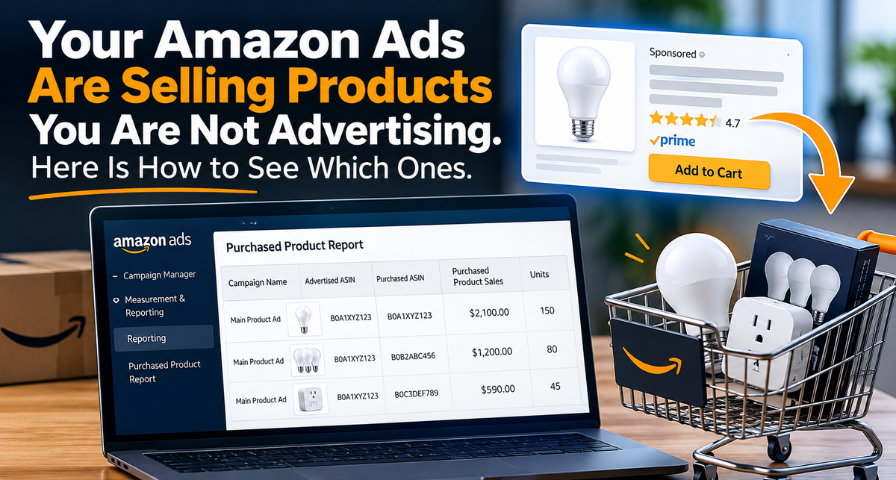
All of the data needed exists in Seller Central. Go to Campaign Manager, then to Measurement & Reporting, then Reporting, then Create Report. Select Sponsored Products, then the Purchased product category, then change the time unit to Summary, choose one marketplace, choose one full month, and include the campaign name in columns. Amazon does update their UI and nomenclature from time to time, therefore, make sure to check your current Reporting tab.
There will be only a few columns doing all the heavy lifting in the CSV you get, but which columns will depend on the report version you selected. The campaign name is a key indicator of who is responsible for the activity. Advertised ASIN shows the promoted product, and purchased ASIN shows the product purchased by the customer. Purchased product sales and units show the number of those purchases.
It will be easy to understand after you know the pattern. If advertised and purchased ASINs match, it is a direct sale. If they do not match and the purchased ASIN is from the same variation family, it is a sister variation sale. If the ASIN is from a different listing, it is a cross-product sale.
It’s hard to see how the report will ever tell you what’s going on because it’s just a plain series of pairs without totals, classifications, or a conclusion. Also, there’s no context it doesn’t even know whether some of the listings have a common parent listing, and your business report with sales per product does not include advertising expenditures. Combining all that data for your extensive catalog is very straightforward but extremely unpleasant.
A Worked Example: The Bulb That Looked Like a Loser
Here is a case from the sample account in the Account MRI, a free scan built by ASGTG to do this joining automatically. It is illustrative data for a ten-product lighting catalogue, not client results.
The sample business sells about $61,000 a month, of which $33,850 is ad-attributed. Of that, $10,500 landed on a product other than the one advertised, which is 31% of ad sales and invisible in Campaign Manager.
Now consider a two-pack LED bulb. Its ads cost $780 and sold $2,100 of the bulb itself, an ACOS of 37.1%. Against a 35% break-even, the console makes it look like a pause candidate. But the same ads also sold $1,790 of other products, mostly the lamp the bulb fits into. Count everything and the total is $3,890, which drops the ACOS to 20.1%. The bulb is a hidden door opener: a modest product that brings shoppers in and sends them toward something bigger.
Two other products in that account tell the opposite story. A floor stand and a desk organizer post ACOS figures of 155.8% and 218.6%, and their ads sell nothing else, so the console is telling the truth. Together they burn about $2,420 a month, which is exactly where the budget for the bulb could come from. Same console, same account, opposite decisions.
A Second Example from Private Label
The same pattern shows up outside lighting. Suppose a seller advertises diabetic ankle socks, and the report shows that many of the attributed purchases are diabetic crew socks and low-cut socks from the same brand. Judged on ankle sock sales alone, the campaign looks expensive. Seen through the purchased products, it is introducing shoppers to the wider range, and shoppers who like one style often buy another. The campaign is working as a front door for the catalogue, even though its own line looks mediocre.
Full-Picture ACOS, Profit, and Timing
Three cautions keep this analysis honest.
First, full-picture ACOS is a custom analytical measure, not a separate metric Amazon provides. It divides ad spend by direct sales plus other attributed sales, so for the bulb it is $780 divided by $3,890. It should not be confused with the product’s standalone ACOS or with the campaign’s actual margin. When you aggregate results, make sure each sale is counted once, so you avoid double-counting.
Secondly, revenue does not equate to profit. If there was an advertisement leading to sales worth $500 of the product in question and $500 of another, then the total attributed revenue will be $1,000. However, if the former gets a contribution margin of 30% while the latter makes 10%, then the value of the campaign will be very different from what the revenue indicates. In order to make an analysis, one should measure contribution profit on the purchased products, taking into account the cost of goods sold, referral fees, FBA fees, and others. The broadness of the revenue does not mean anything in this case.
Thirdly, time is a critical consideration. Attribution conversions can take time to materialize in the reports, and this depends on the nature of the campaigns. A recently concluded month might not have been fully matured with regard to the conversions. It is important to wait for the appropriate attribution window before evaluating the month and ensure that consistent report dates are taken when comparing months.
What the Account MRI Adds
The Account MRI reads your exported reports in your browser, and according to the tool’s own description, nothing is uploaded or saved and the data disappears when you close the tab. It needs only the Purchased Product report to start, and it gets richer as you add the Business Report, Selling Economics, and the previous month’s files.
It does three things worth knowing about. Follow the Spend maps which advertised products lead to which purchased products, so you can spot the listings that generate sales elsewhere. If You Paused It lays out, for each advertised ASIN, what its ads sold on itself, on sister variations, and on other products, along with own ACOS and full-picture ACOS. The Doctor’s Desk turns everything uploaded into a ranked action list with a dollar reason for each item. It also declines to give a verdict on products with too little volume, which is a feature, since a tool that sounds confident about everything is one you stop trusting the first time it is wrong.
You can do a rough version in a spreadsheet by matching advertised to purchased products for a single month. It will teach you more about how your catalogue behaves than a quarter of staring at campaign dashboards.
Who Should Care, and Who Can Skip This
It can pay off best for brand owners and private labelers who have multiple related products and actual spending on ads, around $5,000 per month or more. Related accessories, consumables, kits, family sizes/colours and all that is in the frequently bought together category are the best fits. Large catalogue resellers will find this valuable as well, because the halo effect approach will tell us which products attract customers to other products in the shop. Single ASIN sellers do not need to consider this strategy at all; there is no halo effect, and Campaign Manager is giving an accurate report anyway..
Make It Part of Your Monthly Review
The main takeaway is simple and hard to follow through: the console attributes the sale to the ad that was clicked and not to the product that was purchased. On any multi-product account, that disconnect works to quietly distort the decision-making when it comes to optimization of Amazon PPC campaigns and ACOS.
Do not perform this once and forget about it forever. Integrate purchased-product analysis into your routine monthly PPC assessment. Generate the report after the attribution has aged, assess your ACOS vs. full-scope ACOS, and analyze the contribution margins of your products. Save those campaigns with real numbers that beat break-even even though the console says otherwise, and kill the campaigns that are only selling themselves at a loss.
Before pausing a campaign because of poor ACOS performance, find out what product it is actually selling.
Ready to Grow on Amazon?
Let our experts help you scale your Amazon business with proven strategies.
Get a Free Consultation
Comments (0)
Leave a Comment