How Leaving Unused FBA Shipments Open Can Cost You Money
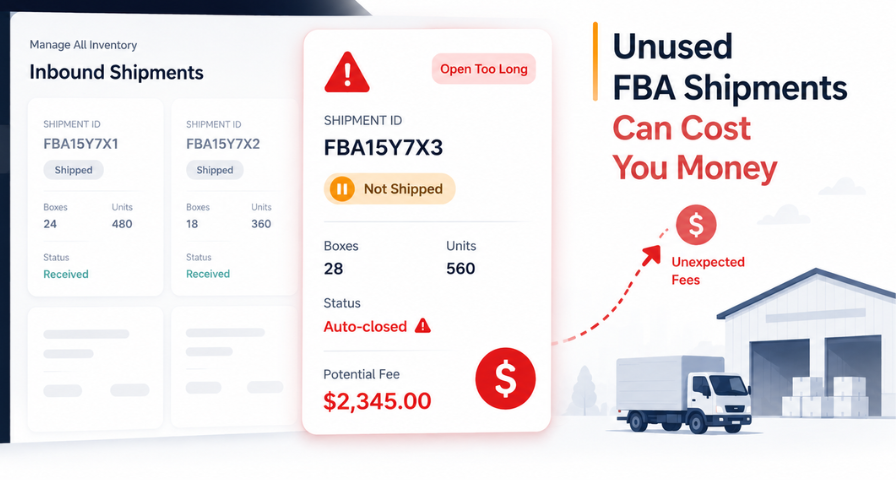
What if an FBA shipment that never left your warehouse could still cost you thousands of dollars? It sounds unlikely, but it recently happened to one Amazon seller, and it could happen to any FBA business that leaves unused shipments open.
Creating an FBA shipping plan is a routine part of inventory management for most Amazon sellers. But plans change. Maybe a supplier delay pushed your timeline back, maybe you decided to restock a different SKU instead, or maybe you simply forgot about the plan altogether. Whatever the reason, here's the part most sellers don't think about: an FBA shipment that never actually ships doesn't just quietly disappear from the system. If left untouched, it can turn into a real financial liability.
This exact situation recently caught one seller by surprise, and it's a lesson every FBA seller should understand before it happens to them. It's worth noting upfront that this account reflects a seller-reported experience rather than an outcome confirmed in Amazon's official policy documentation. Amazon's policies and fee structures continue to evolve, but the case is still a useful illustration of why unused FBA shipments shouldn't be assumed to expire without consequence.
How an Unused Shipment Turned Into Thousands in Fees
One such instance can be found in the seller's recent experience. The seller made the FBA shipping plan in Seller Central, where they were supposed to send their products to one of the fulfillment centers of Amazon. For some reason, the shipment did not leave the seller's building, as the trucks did not come and pick the inventory up, and Amazon has received nothing. As the seller thought, nothing has been sent, so there is nothing to worry about.
That assumption turned out to be wrong. Because the shipping plan stayed open in the system without being cancelled, it was eventually auto-closed by Amazon's system. According to the seller, this triggered what's known as an inbound defect fee, treating the unshipped plan as a failure to meet inbound shipment guidelines. These fees aren't small. In this case, they reportedly added up to thousands of dollars, charged automatically and without warning.
The seller did all he or she should do they made an appeal in order to explain that no products have been sent and no product has been received by the fulfillment center. Obviously, you cannot be charged for the inventory that never left your place of business. The appeal was denied. The same happened with the second appeal.
Why an Unused Shipment Can Still Trigger Fees
It is useful to know why the logic of such fees is used, even if in some cases the result is not really fair. The Amazon Fulfillment Network relies very much on sellers who provide the right information regarding their inbound inventory. As soon as the seller prepares the FBA shipment plan, Amazon starts planning according to the information provided.
Based on Amazon's broader inbound compliance framework, these fees are intended to discourage issues such as incorrect shipment information, quantity discrepancies, or shipping plans that aren't properly managed through to completion. From the available evidence in seller-reported cases, an open shipping plan that isn't cancelled may be treated as an inbound process failure, regardless of whether goods were technically shipped.
Thus, it seems that there is no difference for the system whether "I sent the wrong item" or "I sent nothing at all and forgot to cancel my order." It seems to be an inbound defect in both cases.
This is a critical point for sellers to internalize. The fee isn't necessarily about whether inventory moved. It's about whether the inbound shipment record itself was managed correctly from creation all the way through to cancellation or completion.
The Small Mistake That Became an Expensive One
The mistake in this story wasn't bad intent or poor judgment about inventory. It was an assumption: that not shipping something is functionally the same as cancelling it. It isn't. An open inbound plan is treated as an active commitment until you explicitly tell the system otherwise. If you don't take that final step, the system will eventually take a default action, and in this case that default action carried a steep financial penalty.
This is something that goes well beyond just this particular seller's experience. When managing an Amazon FBA business, there are many different elements that can get messed up: product sourcing, delays from suppliers, shifts in seasonal needs, limits to fulfillment centers' capacities, and changes in sales strategy. Sometimes, your shipment can be completely overlooked because of the shifting priorities. However, the dashboard of the seller won't take into consideration these shifting priorities; it will just see that there was a shipment plan and it wasn't shipped yet.
The solution, as you may guess, is rather simple. In case you made a shipment plan but then changed your mind about sending this inventory, log into Seller Central and remove each open item associated with your plan right away. Don't wait or expect that everything will be fine without taking action or believe that since nothing happened, nothing will happen. Cancelling shipments must be done just like closing unused purchase orders or reservations.
Who Is Most at Risk?
Every seller does not have equal chances to face this problem. However, some trends make it more common for sellers. For instance, agencies and third-party teams working for brand companies who manage their FBA accounts usually develop test cases, which are then forgotten about. Aggregators and sellers running large catalogs with dozens or hundreds of SKUs have more shipping plans in motion at any given time, which means more opportunities for one to slip through unnoticed.
Businesses relying on multiple virtual assistants or freight coordinators face the same risk, especially when responsibility for closing out a plan isn't clearly assigned to one person. Seasonal sellers are also vulnerable, since shipping plans created ahead of a peak season are sometimes cancelled in spirit by simply deciding not to proceed, without ever being formally closed in the system. Recognizing whether your own operation fits one of these patterns is a useful first step toward tightening the process.
Building a Habit Around Shipment Hygiene
This process becomes particularly tricky when the seller deals with dozens and even hundreds of SKUs. The better way would be the systematic approach. Schedule a weekly review of all open inbound shipment plans in Seller Central, where any plan not updated in seven to ten days will require a review. In addition, you can perform a monthly audit to analyze older plans that were forgotten due to the rush of previous weeks.
It is important to designate the owner of this procedure, which can be an inventory manager or an operations manager. It is necessary to maintain a simple spreadsheet with the list of all current plans with an estimated ship date to identify any plan that is not moving anywhere. This does not take any sophisticated tool or a lot of time but only discipline.
It's also worth training anyone on your team who has access to create inbound plans on this exact point. Inventory managers, virtual assistants, or freight coordinators may create plans as part of routine forecasting or testing, without realizing that an abandoned plan carries financial risk if left unattended. A simple internal standard operating procedure (SOP), stating that any plan not shipped within a defined window must be cancelled, can close this gap before it becomes expensive.
Final Thoughts
This story is a reminder that selling on Amazon isn't just about sourcing good products and writing great listings. It's also about managing the operational and administrative side of the business with the same level of care. Fulfillment by Amazon offers tremendous convenience, but it also comes with a system of rules and automated triggers that don't always account for intent or context. Appeals, even well-documented and reasonable ones, aren't guaranteed to succeed once a fee has been assessed.
Before closing your Seller Central account each week, set aside a couple of minutes to check any open FBA shipments that you have. In case there are any shipments that are no longer going anywhere, cancel the shipment right away instead of waiting for it to magically sort itself out. This will only take a minute or two, but it may end up saving you money.
What you need to remember is pretty simple: if you don’t ship the inventory, cancel the shipment. Amazon doesn’t pay you for what you planned to do; it pays you for what its records indicate you’ve done. And sometimes, not making a mistake can be even more important than making a sale.
Ready to Grow on Amazon?
Let our experts help you scale your Amazon business with proven strategies.
Get a Free Consultation