Amazon's Hidden Catalog Changes Could Be Killing Your Rankings
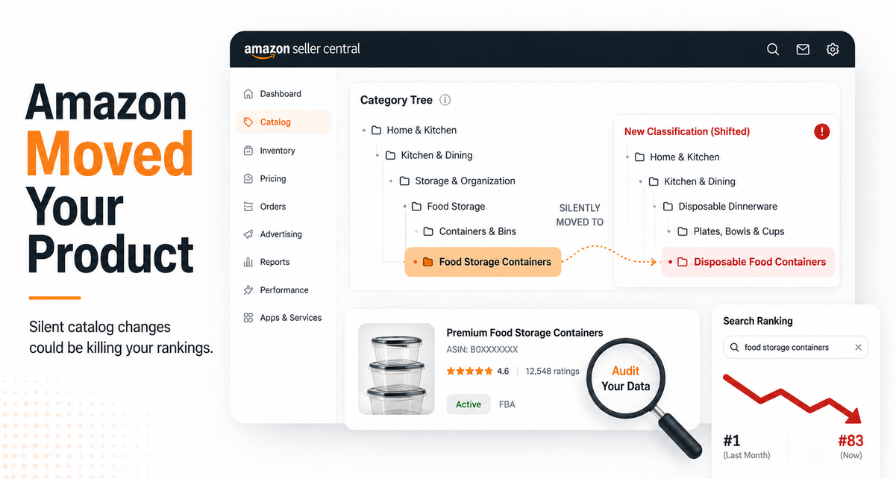
If your Amazon ranking plunged overnight and you never touched a single word of your listing, don't worry, you aren't going crazy. Sellers have been finding out that their listings have been reclassified by Amazon without being told at all. What was once a top-ranking product is now languishing on page eight, your PPC is underperforming for reasons you can't identify, and submitting a support ticket won't help because "nothing is broken."
Your problem isn't a bad SEO strategy. It is the backend data that goes with the listing, and one attribute in particular called the Item Type Keyword (ITK).
The Three Layers Behind Every Listing
Every product on Amazon sits inside three nested layers. The browse node is the broad category umbrella, like Home & Kitchen or Grocery, and it's mostly automatic. The product type sits underneath it and determines which attribute fields you're even allowed to fill in. Beneath that is the item type keyword, the granular descriptor that decides which search terms your product is actually eligible to rank for. This is the layer sellers have the most control over, and it's also the one most commonly getting misconfigured right now.
Consider the browse node to be the highway, the product type to be the avenue, and the ITK as your precise street address. Alexa, and in more recent times, artificial intelligence-based shopping assistants, act like couriers who will deliver you the customers right at your doorstep via the specified street address. Provide a wrong street address and you won't receive any customers regardless of the perfection of the listing you have written. An optimized listing by a seller for a children's toothbrush will fail to rank for "kids toothbrush" when the ITK is set as "adult toothbrush."
How Amazon Decides Your Classification Now
Amazon's classification engine no longer looks at a single data point. It evaluates your title, bullet points, description, backend attributes, product specifications, and increasingly, your images through automated visual analysis. It also factors in customer behavior, including what people click and buy after searching a given term. This means classification today is less about filling out a form correctly once and more about consistency across every piece of content tied to your listing.
This is how listing copy itself has turned into a classification indicator. In case if your bullets and copy contain arts-and-crafts wording, Amazon will reclassify your toy product as an arts and crafts one despite the fact that you have initially wanted to offer some other item. The opposite situation also occurs and is quite beneficial: fixing your listing copy for a new category will make Amazon reclassify your product in several days even without opening a support request. This demonstrates the evolution of Amazon's policy of moving away from keywords matching to more sophisticated product recognition.
Why This Broke in February 2026
However, when Amazon reorganized its product type and item type keywords in February 2026, as part of the process of restructuring of the Amazon catalog, it stopped supporting the usage of flat file templates. The ones who continued to use old templates unintentionally gave incomplete information since their structure had changed.
Another practice that ceased to exist is called sibling borrowing. It involved taking the attributes of adjacent product types to provide missing information for the category being offered by the seller. As per the changes made by Amazon, it now requires category-specific information.
Amazon provides no alert. No email or warning notification is provided when your products are assigned a different category. For instance, one seller of air mattresses only discovered that his entire inventory had been moved to "inflatable beds" after several weeks of decreased sales. He found out on his own without any notification from Amazon.
How to Audit Your Own Catalog
To begin with, you should make sure that your product type in Seller Central at the listing's edit page matches your actual front-end category. If not, the discrepancy in the frontend and the backend category indicates that there is something wrong.
Then, find your current ITK. It can be found in the attributes of the product, specifically in the "Item Type" or "Item Type Keyword" fields depending on the category template you use. Download your Category Listing Report from the Inventory Reports section in Seller Central, and if you have an older version of your report, created in 2025, compare the two. Changes in product types or ITKs between versions can explain mysterious drops in the rankings.
A couple of symptoms will help you to figure out whether the problem is due to a reclassification. The search terms that were converting before suddenly start showing irrelevant competitors in your manual searches. Your product displays a different breadcrumb category on the live page compared to the notes you took or the previous template you used. Impressions of your products in PPC decrease sharply for those keywords that worked before without any change in bid or budget from your side.
Take special care of the family variations during the process. Each child in the variation family must have the same ITK. If variation listings turn out to be dispersed between several categories due to the system's restructuring that occurs more frequently than anticipated by sellers, these listings will compete with one another on the ranking factor and may even lack their valuable shared reviews. Still, it needs to be considered that the full backend correction might lead to the checking of the policy on variations by Amazon, and this is an additional risk to take into account.
Why This Matters Beyond a Single Fix
This isn't a one-time glitch to patch and forget. It reflects a real change in how Amazon's search and discovery systems work. Amazon backend optimization, accurate product classification, and clean backend attributes are becoming as important to visibility as keyword-rich titles once were. Sellers who only think about Amazon listing optimization in terms of front-end copy and Amazon search ranking tactics are increasingly missing where the real leverage sits.
Any error that exists in your backend data will carry through into anything else that you do using this data. Your paid-per-click advertising spending, your search engine optimization, and even your wonderfully designed creative will all go through a flawed address before being delivered to the consumer. Amazon is switching away from keyword matching in order to better understand products, and this trend will only continue as artificial intelligence shopping technologies continue to become an important part of consumer shopping and searching. If you continue to optimize things just because you can see them, then you'll eventually fall behind people who begin thinking strategically about their backend catalog data. Make sure that your street address is correct before you touch anything else.
Ready to Grow on Amazon?
Let our experts help you scale your Amazon business with proven strategies.
Get a Free Consultation
Comments (0)
Leave a Comment