Amazon Seller Central Multichannel Selling Tools: One Dashboard for Every Channel
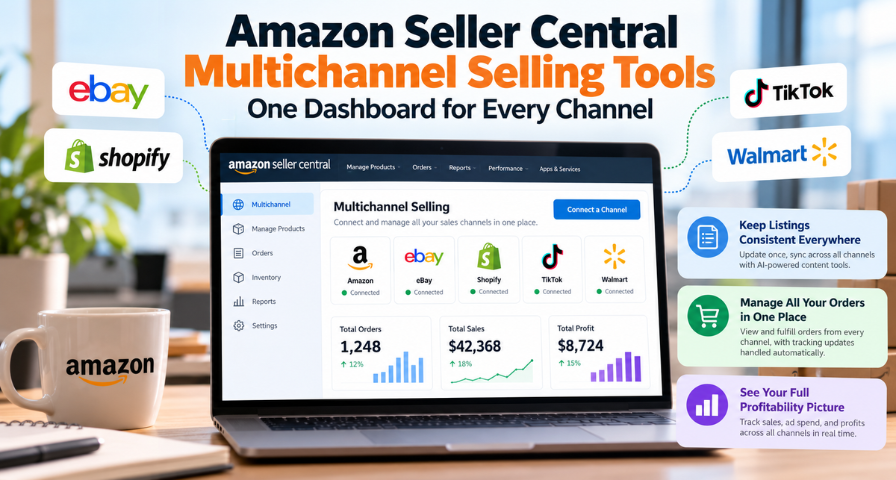
If your products are sold on various marketplaces, you would understand that running your business can be as difficult as making your sales. Different marketplaces have different rules and reporting methods for your listings and orders. You have to log into your account on each marketplace through its own browser tab every day.
Seller Central on Amazon has recently launched some new multichannel selling tools designed to simplify that process. It allows sellers to link their accounts on eBay, Shopify, TikTok, and Walmart, as well as manage listings, orders, and profitability of all their businesses from the same place where they manage their Amazon business. This launch was gradual and was targeted only at US sellers, but it was free for them. In this article, I would like to tell you what has happened and what should happen.
What Is Actually Changing in Seller Central
Amazon Seller Central has long served as the dashboard of selling Amazon. It will soon be expanded to serve as the dashboard of your selling through all your storefronts. After connecting your accounts, all activity from your other channels will be seen along with your Amazon activity in place of being housed separately.
Three aspects receive the most focus. Listing management helps changes made in one place extend to the channels where your listing is active. Order management brings orders from all connected channels into one page. Profitability reporting gathers profit, advertising spending, traffic, and sales metrics in order to be able to analyze the performance of products across all channels.
It is best to make clear what it is not first of all. It is not meant to substitute for your shop in Shopify or your seller account on Walmart. They are both still there, and you still hold the relationship with each channel. The difference comes in the fact that you may not have to be in each channel anymore to conduct your business.
Why Amazon Is Building This Now
Using multiple channels for the sale was once a tactic only suitable for larger companies with operations departments. Now it is common wisdom even for smaller and mid-level sellers. Depending on a single platform makes the company vulnerable to any changes in terms of fees, algorithms, and even the closing of the account, which can result in zero revenue almost instantaneously. The use of multiple channels, such as Amazon, a branded store, Walmart, eBay, and a social commerce channel, such as TikTok, is a reasonable decision.
The diversification strategy comes with an implicit price, however. Each new channel increases the number of locations in which data about the product, order, and statistics should be correct. Quite often, sellers have to pay for additional third-party software or a part-time worker.
The reasoning behind this move by Amazon is not too difficult to figure out. The sellers who perform all of their business from within Seller Central are bound to be loyal customers, and they will most probably also make use of Amazon’s fulfillment facilities if the order is coming from elsewhere. This way, Amazon will become the central point of the entire business, thus making it more difficult to switch companies. While this is definitely a business concern, it is also a genuine one for sellers.
One Edit, Every Channel: Listing Management
Listing consistency is probably the most dull and critical part of multichannel ecommerce management. Being accurate about your product description on Amazon and obsolete on Walmart will confuse customers, cause them to return products, and sometimes make you break compliance rules. To keep things consistent, you typically have to copy and paste each change to individual channels manually, taking into account their formatting rules.
As Amazon says, you can optimize a product description in one place on the Manage Products page, and then it will be automatically optimized for all channels where it is available, following individual formatting rules of each channel. Since titles, bullets, and character limits may differ from platform to platform, having it all done by system should eliminate the most boring aspect of the task.
In addition to that, the AI-based listing optimization technology from Amazon goes one step ahead and generates content for various channels. This task that used to take hours of writing can now be completed within minutes in case you have a shop with hundreds of items. This tells us when we need to update product descriptions on a quarterly basis or even more often. AI-generated copy works best as a strong first draft rather than a finished product. You remain responsible for product specifications, safety or material claims, brand voice, and compliance with each marketplace’s rules. Because one edit can reach several channels at once, one mistake can too, so a quick review before publishing is time well spent. It is also worth checking early how each channel displays the reformatted content, since “automatically formatted” does not guarantee it will look exactly as you intended.
Orders in One Place: Cross-Channel Order Management
Order fulfillment is the area in which multichannel businesses run into trouble. Every channel sends its own orders to its own dashboard with its own shipping conditions. When an order comes in through Shopify, and you wish to fulfill that order using the inventory you currently have available at Amazon's facilities, the traditional procedure takes more than a few steps to complete.
Using the updated software, all orders from the different channels come in one screen. As mentioned in Amazon's video demonstration, the process is relatively simple: Select a Shopify order, and choose to fulfill it through Amazon's inventory. All the information is updated accordingly, so there is no need for extra effort from your side to keep the buyer updated.
In addition to simplifying the procedure for you, the process can be beneficial because the lack of tracking information is often the cause for customers to contact the customer support center for assistance. It is hard to tell whether it will affect your performance on any particular channel.
Planning is another aspect to consider. If a larger portion of your orders is able to be fulfilled from stock kept in one network, then it could improve the integration of the inventory management, although the effectiveness depends on what type of integration will be used and whether the levels of the inventory on each channel will be synchronized. Before you decide to use it, make sure how inventory stock changes on each channel, and consider closely the shipping fees you will have to pay when Amazon fulfills your order placed somewhere else.
The Full Profitability Picture
The amount of revenue is obvious. However, profit is much trickier. A product may have different costs related to its selling on various channels, and many multichannel sellers find out after working for hours in spreadsheets that their top-selling channel is actually not the most profitable one.
Nowadays, these tools help provide an insight into how profitable the product is in the process of selling through all channels with the ad spend, traffic, and revenue information in one place. It helps greatly compare the performance of products sold through different channels and make decisions fast. What channel suits this product better? Does my ad spending pay off more there than elsewhere?
Despite the efficiency of an integrated dashboard, it has its limitations that are important to acknowledge. Data related to ad budget and sales is good enough to begin with, but the full calculation of profitability might also entail such aspects as costs of goods sold, fees of the marketplace where the sales occur, shipping costs, refunds, and returns. Revenue, contribution margin, and net income are different metrics, and a metric presented on the dashboard cannot be considered full net income. Verify the numbers by comparing them with your actual numbers for a few products.
A Practical Example of How This Could Play Out
Consider a vendor who has an emerging home goods brand. She is selling a ceramic planter through Amazon, via her own Shopify store, and on Walmart, with some items listed on eBay. Now, changing the description after the supplier change requires her logging in to four different systems and making four changes. For an order received through Shopify, she will have to log in to her Shopify system, arrange for delivery, and manually paste the tracking code.
Under this approach, she will update the description one time only, review the suggested version by AI and let it publish across all channels in their respective formats. If she receives an order from Shopify, she will see it alongside other orders from Amazon, choose the Amazon fulfillment service, and tracking details will get published automatically to the customer. At the end of the month, she will compare the performance of the planter on each channel and ensure that the cost of product and returns are included in the figures. She will realize that her Shopify store gives her the best margin and allocate more budget there.
This is nothing extraordinary individually. But the time saved and business clarity achieved are priceless.
Things to Weigh Before You Dive In
Since the process is gradual, however, the tools will not necessarily be present for all sellers right now. In case you have not seen these tools yet, check back rather than think that you have been somehow forgotten by Amazon. The tools are free, which makes it easier for everyone to try them out, but free tools require effort anyway. If you currently use any dedicated tool for managing your listings and inventory, consider comparing it with Seller Central’s offer before switching to anything new.
There is also a strategic point here. All-in-one solution is more convenient, but it also means that you become more dependent on a single vendor. Think of Seller Central as an effective working environment while keeping everything that concerns customers, products, and finances on your own records. Convenience and independence are not mutually exclusive notions.
Key Takeaways and Your Next Step
While Amazon's new multi-channel selling tools may allow for better coordination of listings, orders, and performance metrics between several marketplaces, their actual usefulness is going to depend on your ability to integrate them into your operation. Listing changes will be applied to all channels in the correct format, orders can be managed from one page, with tracking information automatically generated, and the overview of profitability will be presented to help you understand which of your products are actually making you money. All of those things will require certain things to be verified, including formatting, inventory synchronization, fulfillment costs, and calculation of profits.
First thing you will want to do is check if these functions are available within your Seller Central account. Then you should figure out which of the processes involved in selling products online consumes the most amount of your time on weekly basis – listing management, order management, or profitability calculations. After that you should try out the corresponding tool for a few items before applying it to your entire portfolio.
Ready to Grow on Amazon?
Let our experts help you scale your Amazon business with proven strategies.
Get a Free Consultation