Amazon Just Put an Intern Inside Your Seller Central Account: A Practical Guide to Seller Assistant Workflows
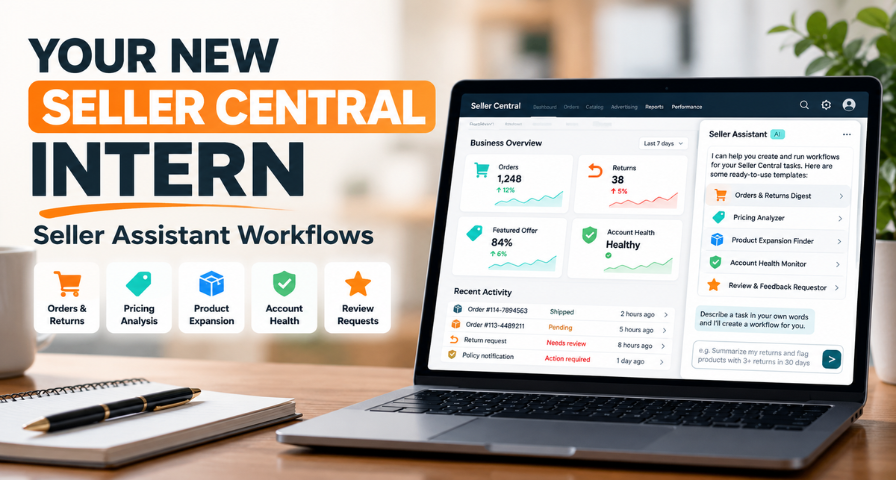
Being an Amazon business owner involves constantly checking orders, keeping track of returns, price comparisons, and managing any health issues of the account. All these actions may seem minor, yet taken collectively, they can take hours every week and tend to exist somewhere in people’s heads or forgotten tabs in a browser.
Amazon Seller Assistant Workflows is a new product designed specifically to solve this problem. You state what kind of a task you need to do, check the workflow suggested by an assistant, and approve it either to schedule it or execute it when necessary. This way it can be compared to an intern, which will automate all these monotonous actions.
This product was recently introduced during Amazon Accelerate in Seattle and is currently rolled out for US accounts. This is what has been added, how the five starter templates work, how you can start working with it this week and how to determine whether automation is paying off.
What Changed and Why It Matters
The Seller Assistant was originally created as a Q&A service. You ask, it answers, and when you close the tab, the session ends. Two things about the tool have changed following the September update. According to Amazon, first, the assistant now has persistent memory of pricing strategies, inventory flows, and growth goals of each seller and will remember it throughout Seller Central, Amazon Quick, and Claude. The second change, the subject of this article, is workflows. Workflows are custom automatons running continuously, observing the circumstances and reacting to them even when the seller is logged out of Seller Central.
Memory and workflows are two different features. Memory will allow the assistant to understand your business, whereas workflows will be the standing orders based on that understanding. What changed in practice is switching from the assistant that reacts to being asked to the assistant that keeps observing all the time.
Why do we need it? Sellers already have too many observation tasks, and delegating them to the software allows more time to think of revenue generation. And having more of sellers’ workflow done through Amazon's own services brings some commercial value along with the convenience.
How Amazon Seller Assistant Workflows Operate
There is no need for any installation. Click Seller Assistant in the top right corner of Seller Central, and the chat window will appear on the left side. Just type your query in the box on the bottom.
The assistant creates a workflow from your description, defines the steps, and shows you the plan. Nothing starts until you approve it. And your approval needs accuracy. You give your approval to the workflow before it goes live, which does not mean that you have to approve every single action that takes place. After the activation, a workflow acts according to the plan, so when approving it, you just give your standing instruction. Think of reading the procedure of a new employee and asking yourself what it can do and how frequently.
Once activated, workflows work according to schedule or on demand, and you can view the list of them and the history of their execution and manually start or archive a run through the chat. Also, Amazon states that workflows work within the guardrails that you create and leave the audit trail for every action, which comes in handy when multiple people have access to the automation process.
The Five Starter Templates
Amazon started with five pre-packaged templates that take the place of tasks that require a person to remind himself of doing them.
The Orders and Returns Digest offers you a one-stop solution for reviewing recent orders and returns. It highlights seller-fulfilled orders that are close to their ship-by deadline and identifies those products that have received more than three returns in thirty days. Such returns normally indicate over-promising in listing, a decline in the quality of the suppliers' product, or a problem with the size of the product. The digest only helps you to find the place from which to start, while analyzing the reason for returns falls under your responsibility.
The Pricing Analyzer helps you understand when you lose the featured offer, how much the price gap is and how high your fees are at each price point. This template doesn't give you an indication about pricing strategy, which is quite a smart approach to its design. There is no need for a pricing strategy that wins the Featured Offer but destroys your margins in the process.
The Product Expansion Finder begins with your catalog, identifying related products together with the gating status of each, as well as their fee and competitor information. Gating awareness before spending time and money could save a failing product launch.
The Account Health Monitor prioritizes your defects based on severity and indicates those that have a possible appeal process. Though it won't create the appeal, it will show you where to start looking. Amazon account health monitoring tends to go wrong due to negligence rather than because of difficulty, and a continually updated checklist will decrease chances of ignoring anything. You should always open the original notification first before taking any actions.
The reviewer and feedback requestor automatically request your customers to leave a review and feedback. The manual process can become inconsistent as your order volume increases.
Two Illustrative Examples
While these are not actual Amazon cases, they do represent how the parts work for real Amazon sellers.
Think of a seller that manages hundreds of product variations. An analysis of the returns on a daily basis highlights certain items that have repeated returns. He clicks the "return reason" and realizes that customers complain about the fit. The workflow pointed out the right place to pay attention; the seller has found the problem and made the changes.
Now picture that the Pricing Analyzer alerts you that a certain product is losing the Featured Offer despite a small price difference with its competitors. While the first reaction would be to lower the price immediately, a more prudent seller will first look into other possible variables influencing the offer, as well as check profitability at the new price point.
Your First Week With the Assistant
Start with the workflow that addresses your most immediate operational risk. If you have unresolved account health concerns, begin with the Account Health Monitor, since it reads and ranks rather than changing anything. If shipping deadlines or repeated returns worry you more, begin with the Orders and Returns Digest, scheduled for a time before your workday starts. Either way, review the first outputs against Seller Central directly and note a baseline.
Once you understand how the first workflow behaves and what its run history shows, add the Pricing Analyzer for your ten highest-revenue products. Look for patterns. Losing the Featured Offer by small margins across many items suggests a strategy question, while large gaps on a few may mean a competitor has different economics.
Hold the Product Expansion Finder and the Review and Feedback Requestor until you trust the approval and history features. The requestor touches customers, so read its plan carefully first. After that, you can write your own workflows. Amazon’s examples include an alert when a top product falls below four stars, which shows the narrow, specific instruction that tends to work best.
How to Measure Whether Automation Is Working
The worth of a workflow is not based on the amount of task automation but whether the business is running smoothly. Look into the efficiency with which deadlines are being flagged, how frequently recurring returns are investigated earlier, and how account health issues are examined before they become critical. Consider the false alerts and the time taken for validation of the results too. Once two to four weeks have passed, evaluate the workflow against your previous manual system. If the workflow saves time while ensuring proper oversight, continue using it. Otherwise, tweak it.
Limitations and How to Work Around Them
The tool can save you time; however, its effectiveness is dependent on the data and actions provided to it. It uses Amazon data through the Seller Central. Independent coverage reveals that Amazon has yet to reveal whether workflows can be used on other channels, across multiple accounts, or if they take into consideration costs external to Seller Central. If your actual margin relies on the cost of suppliers or off-Amazon advertisements, enter the data prior to changing any prices.
Always validate the output using the underlying Seller Central reports as a confirmation that the problem was solved; this is not always accurate based solely on a report. Always review the active workflows when changing your pricing strategy or restructuring your catalog.
Data handling is a separate question. Amazon says Seller Assistant is built on Amazon Bedrock using Anthropic’s Claude models and that seller data used by the assistant stays within Amazon’s infrastructure and is not shared outside Amazon. That is Amazon’s own statement, so sellers with strong concerns should read the applicable terms directly. There is also a commercial backdrop: Amazon is offering primary account holders twelve months of Amazon Quick Plus free for sign-ups before December 31, 2026, which suggests it wants sellers building habits around its assistant ecosystem.
Key Takeaways
It is not Amazon Seller Assistant Workflows’ responsibility to run your business, and it isn’t supposed to. It can free up a certain type of low-level surveillance for you, which concerns the monitoring of deadlines, return surges, price differences, and account health. The workflows work with natural language commands, preview their operation before execution, and maintain logs for you to check. The pricing, appeals, and improvements are still under your responsibility.
Start small. Choose one of the workflows that correspond to the major risk area of your business operations and run it for two weeks, then evaluate it according to the criteria mentioned above before implementing any customer-oriented or price-related automation. Then think of a recurrent process within your business that relies on your memory and there you have the next workflow.
Ready to Grow on Amazon?
Let our experts help you scale your Amazon business with proven strategies.
Get a Free Consultation