Amazon FBA Shipping Method Mistake: SPD vs. LTL and What to Do Next
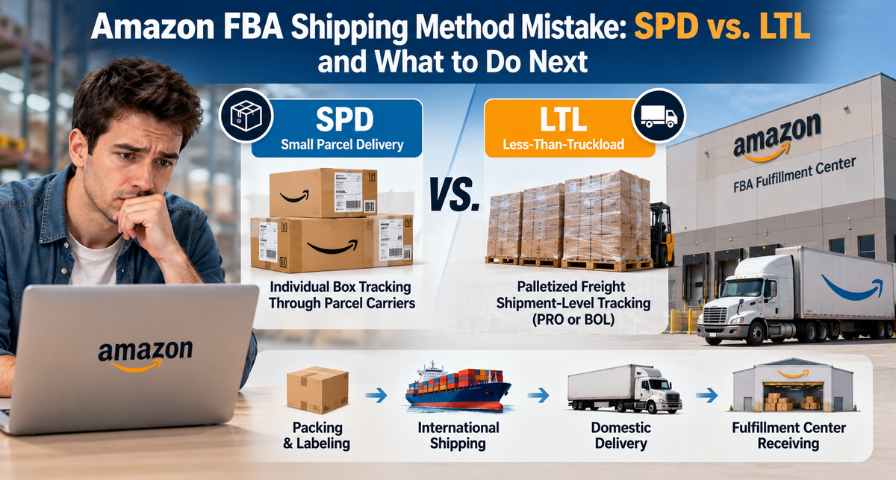
A new seller has packed forty cartons, confirmed the plan in Seller Central, and handed everything to a freight forwarder. Then the forwarder sends a booking number and a container number, and the Amazon FBA shipping method chosen weeks earlier (Small Parcel Delivery, or SPD) suddenly looks questionable. Nothing has gone wrong yet, but nothing feels certain either.
This article explains how that uncertainty arises, what Amazon’s published requirements actually say, which risks are documented and which are only possible, and how to work through the problem when inventory is already moving. It is written for first-time sellers and for experienced sellers managing international freight.
Understanding the Shipping Method Mismatch
The shipping method you select in Send to Amazon should describe how goods will actually reach the fulfillment center. Amazon’s Partnered Carrier program page frames the difference simply: small-parcel deliveries are boxes that are each individually labeled, while LTL, intermodal, and FTL shipments combine boxes on pallets. The number of cartons does not decide this. Forty boxes could travel either way, which is why the question belongs to the transport plan, not the carton count.
A mismatch appears when the Seller Central configuration says SPD while the physical movement looks like a freight arrangement, or the reverse. The warning sign is often an unfamiliar reference from the forwarder. But a booking number or container number does not by itself show that a shipment is LTL.
Ocean Containers Are Not Automatically LTL.
Booking and container numbers usually identify an ocean leg. Amazon’s seller requirements page for LTL, FTL, and FCL deliveries treats ocean full container load (FCL) as its own category and states that fulfillment centers accept FCL shipments provided they are safe to unload and will not be damaged in transit (a forum copy of the page is available). So a container reference might belong to an FCL delivery, an intermediate leg before a domestic handoff, or a shipment that ends as LTL, FTL, or even parcels. Before calling anything a mismatch, establish which of these you are looking at.
The Transportation Journey
Think of four stages. Cartons are packed and labeled at the supplier or warehouse. They move on an international leg, where a booking or container reference may apply. After arrival, a domestic final-mile delivery takes place, and this is the stage where parcel or freight handling must be confirmed. Finally, the delivery reaches the fulfillment center, where the shipment details and any documentation need to line up. Not every shipment follows exactly this sequence, so treat it as a mental model, not a rule.
SPD vs. LTL vs. FTL: Which Amazon FBA Shipping Method Fits?
SPD means individual boxes moving through parcel carriers. LTL means palletized freight sharing truck space with other shipments, and FTL means freight that fills a trailer. Amazon’s shipping and routing requirements apply to every box regardless of method, and its truckload delivery guidance confirms that individual box requirements also apply to boxes loaded on pallets.
That last point is the key to avoiding a common misunderstanding. A carton on a pallet still carries its FBA box ID label. Box labels are not what separates SPD from LTL. What differs is the carrier tracking and reference Amazon expects for the workflow you selected, so it helps to keep three concepts apart.
Concept | What it identifies | Where it applies |
|---|---|---|
FBA box ID | A single box inside Amazon’s shipment workflow | Present on cartons in both parcel and palletized shipments |
Carrier tracking ID | An individual parcel moving with a parcel carrier | SPD, including per-box tracking for non-partnered carriers |
Freight reference | The whole freight shipment, typically a PRO number or Bill of Lading (BOL) | Pallet shipments (LTL/FTL) |
A PRO number is assigned by the freight carrier to your shipment, and a Bill of Lading is the document describing what is being moved and under what terms. Ocean booking and container numbers belong to the forwarder’s and shipping line’s systems. These identifiers are not interchangeable, and what a field accepts depends on the carrier, transport mode, and workflow. One seller in an Amazon forum thread reported that a forwarder’s delivery note reference was rejected as an invalid PRO number, which shows how easily a plausible-looking reference can fail validation.
Why Tracking and Shipping Mode Matter
The selected mode determines which tracking fields Seller Central asks you to complete and what Amazon uses to plan around your inventory. If the details you can supply do not fit those fields, you may be left with missing or invalid entries and reduced visibility.
Appointments add a second layer. Amazon’s carrier requirements page states that no LTL, FTL, or small-parcel delivery will be accepted at a fulfillment center without a scheduled appointment, that carriers must present a delivery manifest or physical BOL, and that only authorized carriers can book appointments. Who schedules depends on the arrangement. With Amazon’s partnered LTL service, Amazon manages scheduling for you, while with a non-partnered carrier you or your carrier must arrange it in advance. The practical question is not whether your shipment needs some form of appointment, but who is responsible for it under your actual arrangement.
Can You Change the Shipping Mode After Confirmation?
Once a shipment is confirmed, the options for changing its configuration may be limited. Which actions remain depends on the shipment’s status and the applicable Seller Central workflow. In the case study below, Amazon Support stated that the shipping mode could not be changed after confirmation. I did not find an official Amazon help page establishing that as a universal rule, so treat it as shipment-specific guidance.
One related detail is worth knowing. An Amazon staff reply in a seller forum thread says carrier names and tracking information can be updated any time before delivery to the fulfillment center through the “Send to Amazon: Tracking details” page. That concerns tracking entries, not the shipping mode itself, but it suggests some details stay editable. Request shipment-specific guidance before cancelling, recreating, or recalling anything.
Potential Receiving Risks
It helps to separate what Amazon documents from what might happen. Documented points include the appointment requirement above, the BOL requirement for freight deliveries, and a warning that failing to follow shipping and routing requirements may lead to refusal of inventory or blocking of future shipments. Amazon also states that any portion of a shipment can be refused if staff cannot safely unload it without added cost to Amazon.
Everything specific to a mode mismatch is a possible consequence, not a guaranteed one. These include receiving delays if arrivals cannot be matched to expected details, appointment problems where one applies, possible handling charges, limited in-transit visibility, and in some cases refusal. I have not found Amazon guidance saying a mismatch always triggers any of these, or that it never does. Any fee is something to ask about, not an assumption.
Case Study: 40 Boxes and Shipment FBA19LW3SH04
An anonymized seller prepared 40 boxes under shipment ID FBA19LW3SH04 and selected SPD in Seller Central. The freight forwarder then provided a booking number and container number for a shipment handled as LTL. The seller asked Amazon Support what that meant.
Support explained that SPD requires individual box tracking IDs, whereas LTL generally uses shipment-level freight references such as a PRO or BOL number. Support also said the shipping mode could not be changed after the confirmation stage and that the shipment might face receiving delays, additional fees, or potential refusal.
The seller’s concern was that the references in hand did not clearly fit the SPD tracking fields. As explained above, the cartons can carry box labels either way, so the real question is whether the transport arrangement and tracking details match the configured workflow. No outcome for this shipment is established here. The lesson is to seek clarification before the cargo reaches the fulfillment center.
How to Resolve an In-Transit Mismatch
Your options depend on timing, and none of these stages carries a promised fix. If the shipment is still being prepared, you probably have the most flexibility, so review the configuration before confirming. If it is confirmed but has not left the warehouse, ask Support whether adjustment is possible before dispatch. If it is already in transit, you need coordinated answers from both the forwarder and Amazon.
Step One: Ask the Forwarder
Start with a diagnostic question: does the container number identify only the international leg, or is the shipment being delivered to Amazon as FCL, LTL, FTL, or SPD? Then ask which carrier performs the final delivery, what reference will exist for that leg and when, whether the freight is palletized, and who is responsible for any required appointment. Request the bill of lading and PRO number as soon as they exist. This step may show that you are looking at an ocean reference, not a final tracking reference, in which case there may be no true mismatch.
Step Two: Contact Amazon Support
With those answers, contact Selling Partner Support. Ask whether the shipment can proceed as configured, which tracking details are acceptable, whether the carrier must arrange an appointment, and what options remain. Keep case IDs and written replies. Consider a recall only after weighing feasibility, cost, and delay, and do not cancel or recreate an in-transit shipment on impulse, since that could cause duplicate labels, inventory confusion, or charges.
A message you can adapt (this is not an Amazon-prescribed template):
Subject: Clarification Required for FBA Shipping Method Mismatch
Hello Amazon Selling Partner Support,
Our inbound shipment [ID] was created using Small Parcel Delivery (SPD), but our freight forwarder has provided a booking number and container number for the transportation arrangement. Could you confirm whether the existing shipment can proceed under its current configuration, what tracking information is required, and whether any corrective action is available at this stage? Please also confirm whether a delivery appointment or additional documentation is required for final delivery to the fulfillment center. We would appreciate your guidance before the shipment arrives.
Thank you.
Prevention Checklist for New Sellers
The shipment plan should follow the transport plan, not the other way around. Before you confirm, run through these checks.
Check | Why it matters |
|---|---|
Ask the forwarder whether goods arrive as parcels or pallets | Determines SPD or LTL/FTL |
Ask whether the container is an FCL delivery or an intermediate leg | Prevents misreading ocean references |
Match the Seller Central method to the final delivery arrangement | Prevents the mismatch |
Confirm partnered or own carrier | Affects appointments and tracking |
Decide who books any delivery appointment | Avoids rejection on arrival |
Ask which tracking reference you will enter and when | Avoids blank or invalid fields |
Save booking confirmations, packing lists, and BOLs | Gives you evidence if Support asks |
Lessons and Conclusion
Seller Central is the digital half of a physical process, and both halves must describe the same shipment. Forwarders know freight but may not know Amazon’s workflow, so share your shipment ID and selected method with them and ask them to flag anything that does not fit. An hour of verification before confirming is far cheaper than correcting a confirmed shipment.
If you are in a mismatch now, establish what your booking and container numbers actually represent, confirm the final delivery arrangement, and get Amazon’s answer in writing before acting. The risks are possibilities to investigate, not verdicts. Policies change, and shipment-specific options can only be confirmed by Amazon Selling Partner Support.
Ready to Grow on Amazon?
Let our experts help you scale your Amazon business with proven strategies.
Get a Free Consultation